
 HealthTrail Medical
 Clock-In Everyday
 RidgePacker
 SnapLedger
 Gold Watcher
 Silver Watcher
 Copper Watcher
 Lithium Watcher
Escalator Field Command
The app built for escalator mechanics, on iPhone, iPad and Android.
Manage maintenance routes, Category 1 testing, SSPI compliance, and inspection documentation, plus a searchable Field Guide to the escalator and moving walk safety codes, all in one offline-first interface designed for real-world field use.



Escalator Field Guide
Companion to the official safety codes
Have a code question? Ask in plain language.
A searchable, plain-language companion to the escalator and moving walk safety codes, built right into the app. Ask it the way you'd ask a senior mechanic, typed or spoken, and get a clear, sourced answer in seconds, no flipping through binders on the job.
- Ask in plain language, typed or spoken, and get a clear answer with the exact code section it came from.
- Jump straight to any rule by its code number.
- Open linked references between sections without ever leaving the app.
- Bookmark and highlight the requirements you rely on most.
- Drawn from ASME A17.1, A17.2, CSA B44, and the MCP.
Ask a question, get a sourced answer in seconds, citing the exact code section. (Sample data shown.)
What it does
Maintenance routes
Build and run your daily route. Each unit carries its own equipment specs, contacts, and full service history, so the next visit picks up where the last one left off.
Category 1 testing
Log Cat 1 tests against the specific units they belong to. Records stay attached to the equipment, not buried in a folder somewhere. Put a unit on hold when it's out for the year, then share a completion report showing every unit's pass or fail.
SSPI compliance
Document SSPI work cleanly so audit trails stay intact. No more hunting through paper logs or shared drives the day before an inspection.
Equipment specs & history
Track equipment data, model details, and full service history per unit. Add notes, photos, and inspection records as you go.
Documents, always offline
Upload manuals, test reports, photos, and any supporting documents so everything for the job lives in one place, organized and available with no signal. Search inside a PDF for a word or a part number and jump straight to the page it is on.
Time tickets & timesheets
Log time tickets for maintenance, repairs, travel, and training, and your weekly timesheet fills itself in from those records. Copy a whole day as one block of text to paste into your company's system, or send it as a PDF with your parking, expenses, and a photo of each receipt. A morning notice tells you what is due before you set off.
Upcoming jobs & PDF reports
See your upcoming service jobs right on the dashboard so bigger work never sneaks up on you, and check them off once they're done. Then generate polished PDF reports, including the State of the Union, a route-wide snapshot of where every unit stands. Need something the app doesn't already cover? Write your own report for a building, pick the units it covers, and attach photos.
Recurring tasks
Some jobs come round again on a fixed cycle. A safety meeting, a monthly report, an annual recertification. Set each one up once and whatever falls on today is waiting across the top of your dashboard the moment you open the app. Units already on a maintenance schedule get added for you.
Technical Safety BC data sheet
Working in British Columbia? Fill in the Technical Safety BC Escalator Data Sheet Checklist on site and send it as a PDF, instead of carrying the paper form around with you.
Works offline
Mechanical rooms, basements, and pit-level work don't have a signal. The app doesn't care. Everything works offline and syncs nowhere unless you choose.
Daily backups & one-file export
Automatic daily backups so a lost or replaced phone never means lost records. Want a copy off the phone? Optional iCloud Backup saves one a day to your own iCloud Drive. It stays off unless you turn it on. One export file carries your records, photos and manuals to a new phone or a coworker. Your data stays yours.
See it in action
Real workflows from the field. (Sample data shown.)
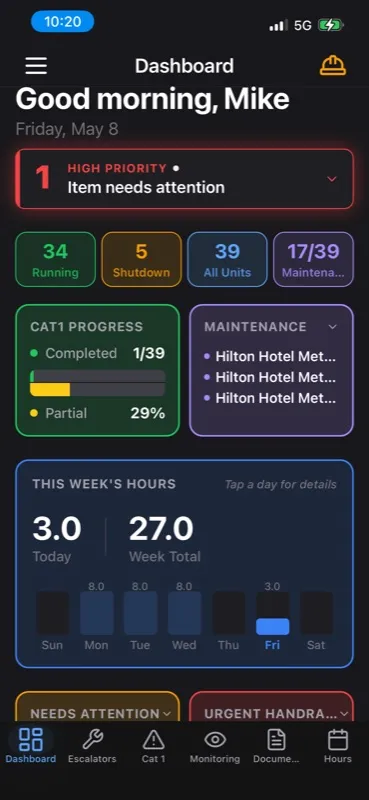
Greeting, status tiles, the Field Guide, week hours, and progress cards in one view.

Completed and incomplete tests across every site on your route.

Brake tests, comb impact, SSPI thresholds: logged per unit.

Shutdown reasons, equipment specs, and contacts together.
Built for the field
This isn't a generic CMMS bolted onto an iPhone. It's built for the specific workflow of escalator and moving-walk mechanics.
Why it's different
No account, ever
Zero signups. Zero credentials. Zero cloud lock-in. Open the app and work.
100% on-device
No telemetry, no analytics SDKs, no third-party data sharing. Your route data, compliance logs, and contacts never leave your phone.
Shaped by real field work
The workflow comes from actual escalator field work, not a product manager's wireframe.
Frequently asked questions
What is Escalator Field Command?
Escalator Field Command is a native app for iPhone, iPad and Android, built for escalator mechanics. It combines maintenance route management, Category 1 testing logs, SSPI compliance documentation, equipment specs, service history, per-unit contacts, and a built-in Field Guide into one offline-first interface designed for real-world field use.
Is Escalator Field Command on Android?
Yes. Escalator Field Command is on Google Play as well as the App Store, so it works on iPhone, iPad and Android.
What is the Escalator Field Guide?
The Field Guide is a searchable, plain-language companion to the escalator and moving walk safety codes, built into the app. Ask a question the way you would ask a senior mechanic, typed or spoken, and get a clear, sourced answer in seconds: complete with the exact code section it came from, drawn from ASME A17.1, A17.2, CSA B44, and the MCP. You can also jump to any rule by its code number, open linked references between sections without leaving the app, and bookmark and highlight the requirements you rely on most. The Field Guide is part of Pro, the optional in-app subscription.
Does it work without an internet connection?
Yes. The app is fully offline-first. Everything works in elevator pits, mechanical rooms, basements, and any other low-signal environment where escalator work actually happens. Your data lives on the device, with automatic daily backups, optional iCloud Backup to your own iCloud Drive (off unless you turn it on), and one export file carries your records, photos and manuals to a new phone or a coworker.
Do I need to create an account?
No. Zero credentials, zero signups, zero cloud accounts. Open the app and start working. Your data never leaves your iPhone or iPad unless you choose to back it up or export it yourself.
Is my data private?
100%. The app is on-device by design: nothing about your routes, units, inspections, or compliance records is sent to a server. There is no analytics SDK, no third-party data sharing, no telemetry.
Who is it built for?
Escalator mechanics, field service technicians, inspectors, route supervisors, and anyone responsible for ongoing maintenance, testing, or inspection of escalators and moving walks.
How does Category 1 testing work in the app?
You log Category 1 tests against the specific units they belong to, alongside service history, inspection notes, and equipment specs. Records stay attached to the unit so the next time you visit that escalator, the full history is one tap away. A unit that's out for the year can be put on hold, and when you're done you can share a completion report showing every unit's pass or fail.
What is the State of the Union report?
The State of the Union is a route-wide PDF snapshot showing where every unit on your route currently stands. It is one of the polished PDF reports the app generates, ready to share with a supervisor, a building owner, or an inspector in seconds. The dashboard also lists your upcoming service jobs, so bigger work is visible well before it lands on you, and you can check each one off once it is done.
Can the app remind me about recurring work like safety meetings or recertifications?
Yes. Set up the jobs that come round on a cycle once, whether that is a weekly safety meeting, a monthly report, or an annual recertification, and anything due today is waiting across the top of your dashboard when you open the app. Units already on a maintenance schedule are added for you, so the recurring side of your route builds itself.
Can I build my own reports?
Yes. When you need something the built-in reports do not already cover, you can write your own report for a building, pick the units it covers, and attach photos. It comes out as the same polished PDF, ready to send.
Can I keep manuals and test reports in the app?
Yes. Upload manuals, test reports, photos, and any other supporting documents so everything for the job lives in one place and opens without an internet connection. You can search inside a PDF for a word or a part number and jump straight to the page it is on.
Does it track my hours?
Yes. Log time tickets for maintenance, repairs, travel, and training, and the weekly timesheet auto-fills from those records. Copy a whole day as one block of text to paste into your company's system, or send it as a PDF with your parking, expenses, and a photo of each receipt. A morning notice tells you what is due before you set off.
Does it handle the Technical Safety BC Escalator Data Sheet Checklist?
Yes. If you work in British Columbia, you can fill in the Technical Safety BC Escalator Data Sheet Checklist on site and send it out as a PDF, so there is no paper form to carry around or hand in later.
How much does it cost?
Escalator Field Command is free to download, and the free version keeps up to three of your own escalators. The Field Guide is a Pro feature, unlocked with an optional in-app subscription. Pro includes a one-month free trial. See the App Store listing for current Pro pricing.
More for people in the trade:

Get Escalator Field Command
Free download on the App Store and Google Play. Built for iPhone, iPad and Android, designed for the field.
Or browse all Artificial Igknorance apps.